Gaming Monitor Arms & Stands in India — Curved & Ultrawide Ready
Gaming monitor arms for curved, ultrawide and high-refresh panels — up to 49 inches and 18 kg on a gas-spring desk mount. Genuine LUMI stock from Vantage Systems with GST invoice and 3-year India warranty.
The desk space back, and the screen where you want it
A 34-inch curved panel on its factory stand takes the back third of a desk and sits at whatever height the stand allows. On a gas-spring arm it floats over the desk instead: keyboard space underneath, screen pushed back to a proper viewing distance, height set for a long session rather than a short one.
The mount itself is no different from an office arm — same clamp, same VESA plate, same gas spring. What is different is the screen. Gaming panels are more likely to be curved, ultrawide and heavy, and all three push you towards a heavy-duty gas-spring arm rather than a light office model. Refresh rate and panel technology make no difference to the mount; size, weight and VESA pattern are the only things that do.
One caution worth reading before you buy anywhere: check your monitor’s weight without its stand, and use the curved rating if the panel is curved. That is the number that decides whether an arm is right, and it is the number most listings quietly leave out.
- Curved and ultrawide panels up to 49 inches
- Gas spring — heavy screens move at a fingertip
- 460 mm extension for ultrawide viewing distance
- ±180° rotation, tilt ±45°, swivel ±90°
- Cable routing through the arm and post
- Genuine LUMI stock, GST invoice, 3-year India warranty
Before you order
Arms that suit a gaming panel
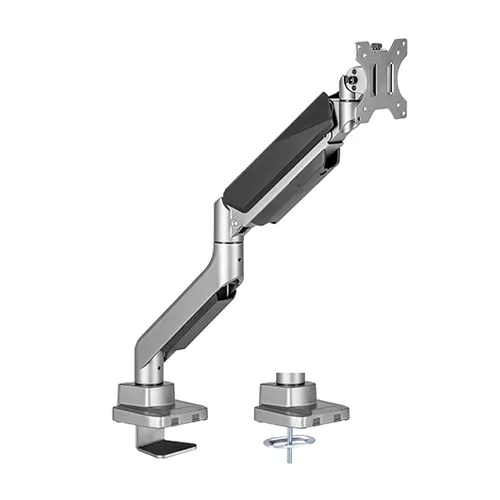
Heavy-Duty Single Gas-Spring Arm
The one to buy for a curved or ultrawide gaming panel — 49 inches, 18 kg flat / 14 kg curved, 460 mm of extension to push a big screen back where it belongs.
- Fits 17″–49″ monitors (incl. ultrawide & curved)
- Holds 1–18 kg
- VESA 75×75 & 100×100 mm
- Gas spring · tilt ±45°, swivel ±90°
- Rotation ±180° · extends to 460 mm
- Clamp or grommet
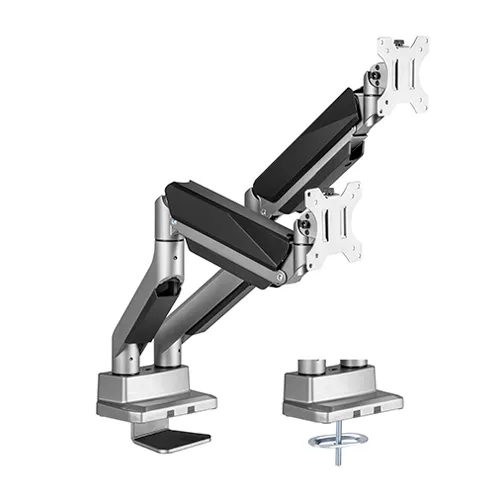
Heavy-Duty Dual Gas-Spring Arm
Two screens up to 35 inches, independently gas-sprung — a main panel and a second screen for chat, stats or streaming.
- Two 17″–35″ monitors from one fixing
- Holds 1–15 kg per screen
- VESA 75×75 & 100×100 mm
- Independent gas-spring tilt ±45°
- Rotation ±180° · extends to 460 mm
- Clamp or grommet
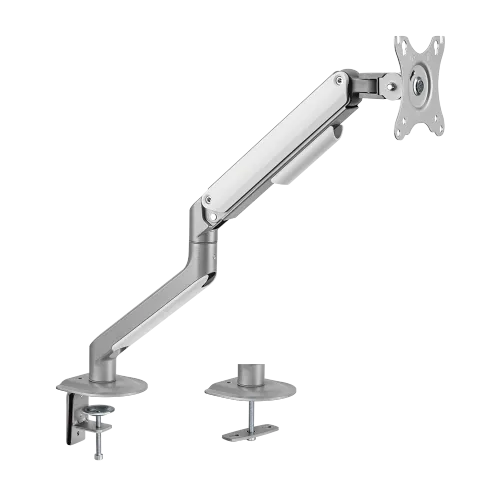
Single Spring-Assisted Arm
For a standard 24–32-inch gaming monitor on a fixed desk, where the heavy-duty rating is not needed and the budget matters more.
- For one 17″–32″ monitor
- Holds 2–9 kg
- VESA 75×75 / 100×100 mm
- Spring-assisted · tilt +55°/−55°
- Rotation ±180° · extends to 453 mm
- Clamp or grommet
Running an ultrawide alongside a second panel? See dual monitor arms for matched pairs, or heavy-duty & ultrawide arms for the full load ratings.
Getting a gaming desk right
Push an ultrawide further back
The wider the panel, the further away it needs to be before the edges stop pulling your eyes. The arm’s 460 mm of extension is what makes that possible on a standard-depth desk.
Eye level on the top third
Same rule as any desk. Sitting upright, your eyes should land on the top third of the panel — on a tall curved screen that usually means mounting it lower than you would expect.
A few degrees of backward tilt
Keeps the viewing distance even across a curved panel and cuts glare from a light behind you.
Cable route before final height
DisplayPort and power run along the arm channel and down the post. Route them first — a short cable is the usual reason a screen ends up lower than intended.
Check the desk, not just the arm
A heavy panel on a thin or hollow-core desktop can flex. The clamp needs a solid edge within its thickness range; a grommet fixing spreads the load better if your desk has a cable hole.
Buy the arm for the screen you have
Over-specifying costs a little; under-specifying puts a heavy panel on a mechanism that cannot hold it. Send us the monitor model and we will confirm before you order.
Gaming monitor arms — FAQs
Mechanically, no — the same clamp, the same VESA plate, the same gas spring. What differs is what gaming screens demand of it: they are often curved, often ultrawide, often heavier than an office panel, and they get repositioned more. So the arm you want is a heavy-duty gas-spring one, not a lighter office model.
Yes, within the derated figure. On the LUMI LDT52-C012 the rating is 18 kg flat and 14 kg curved, for screens up to 49 inches. That covers most 34-inch and 49-inch curved ultrawide gaming panels — check your monitor’s weight without the stand.
Refresh rate has nothing to do with the mount — a 240 Hz panel mounts exactly like a 60 Hz one. What matters is size, weight and VESA pattern. Some gaming monitors put the VESA holes in a recess and ship a small spacer for it; keep it if your monitor came with one.
Desk depth, mostly. A big curved panel on its factory stand eats the back third of the desk; on an arm you get that back for a keyboard, headset stand or controller. You can also push the screen further away, which is what an ultrawide needs to be comfortable, and set the height properly for a long session.
Use a dual arm for two matched screens, or a single heavy-duty arm plus a separate single arm if the main panel is much larger than the secondary one. Do not try to hang an ultrawide off one side of a standard dual crossbar — it is outside what the crossbar is rated to balance.
Both. Single units ship against a GST invoice like any other order, with the same 3-year LUMI India warranty. Call or WhatsApp us with your monitor model and we will confirm the right arm.
Get a gaming monitor arm quote
Tell us the monitor model — we will check the weight and curve rating and confirm the right arm. GST invoice and 3-year LUMI India warranty on every order.